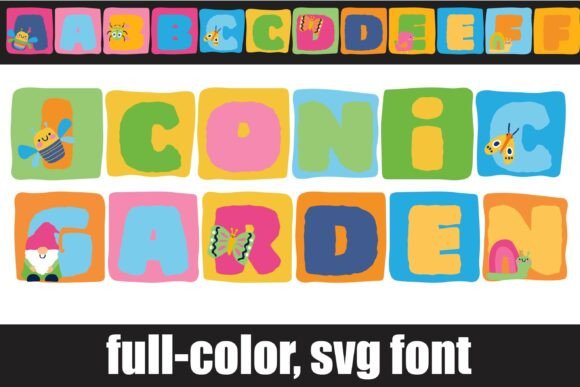
Iconic Garden: A Whimsical Color Font for Web Design
I was halfway through a redesign for a boutique botanical shop when I realized the hero section felt flat. The layout was clean, the photography was lush, but the headline lacked personality. It needed something that didn’t just speak to the audience but invited them into a specific mood. That is when I pulled Iconic Garden into the project. As a web designer who spends hours tweaking kerning and testing responsive breakpoints, I am always cautious about introducing highly decorative typefaces into digital spaces. However, this expressive display typeface changed the entire energy of the page within seconds.
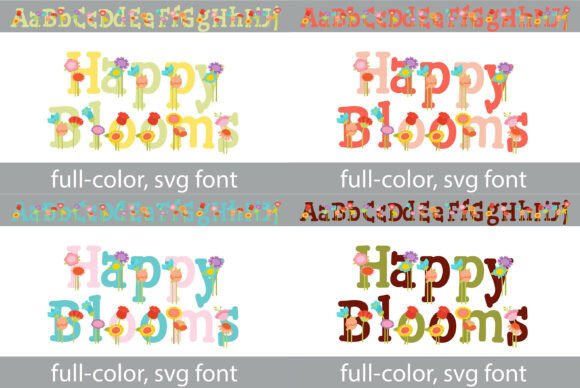
Iconic Garden is not your standard web-safe font. It is a full-color SVG font, which means it brings a level of visual richness that traditional single-color fonts simply cannot match on their own. Capturing a whimsical-and-woodland soul, the letterforms are bold, chunky, and undeniably charming. Testing it in a real browser environment revealed how well it performs as a centerpiece for digital brand identity. It is not just a font; it is a design asset that does heavy lifting for your visual hierarchy.
Bringing Digital Headers to Life
The primary strength of Iconic Garden lies in its ability to command attention without feeling aggressive. In modern typography, we often struggle to find a balance between professional clarity and creative flair. This typeface leans heavily into the latter, making it an ideal choice for hero sections, landing page headlines, and prominent call-to-action areas. When I placed it over a soft, nature-inspired background image, the contrast was immediate. The bold strokes held their own against the photography, ensuring the message remained legible while adding a layer of artistic depth.
For web designers working on portfolio sites, coaching websites, or online stores with a natural aesthetic, this font serves as an instant mood setter. It works exceptionally well for short phrases, brand names, and titles where you want to evoke a sense of wonder. I tested it on a course sales page for a creative writing workshop, using it for the main module titles. The result was engaging and warm, helping to break up the monotony of standard sans serif headers. It transforms a generic layout into a curated experience, encouraging users to scroll further and engage with the content.
Navigating the Nuances of Color Fonts
Working with Color Fonts requires a shift in mindset compared to traditional web fonts. Because Iconic Garden includes built-in color and detail via SVG technology, it renders beautifully in modern browsers, preserving the intricate details of each glyph. This is a significant advantage for creating high-impact social media graphics, digital ads, and campaign landing pages directly within the browser environment. You do not need to rely solely on CSS effects or background images to add texture to your text; the font provides it natively.
However, there are practical considerations for UI designers. While the visual appeal is high, you must ensure that your target audience uses browsers that support SVG fonts. Most modern platforms handle this seamlessly, but it is always wise to have a fallback strategy. I recommend pairing Iconic Garden with a reliable, clean sans serif font for body copy. This creates a balanced typographic system where the display font draws the eye, and the simple body font ensures readability for longer passages of text. The contrast between the whimsical, chunky headers and the neutral, functional body text creates a professional yet approachable digital identity.
Readability and Responsive Layouts
One of the most critical aspects of web design is ensuring that typography scales gracefully across devices. Iconic Garden is a display font, which means it is designed to be seen at larger sizes. During my testing, I found that it performed brilliantly on desktop screens and tablets, where the details of the letterforms could be fully appreciated. On mobile devices, however, care must be taken. If the font size is too small, the intricate details can become muddy, affecting readability.
To mitigate this, I adjusted the line height and letter spacing specifically for mobile breakpoints. I also restricted its use to main headings and avoided using it for navigation menus, form labels, or button text where space is limited. For dense dashboard layouts or accessibility-heavy interfaces, a simpler typeface is always the safer choice. But for marketing-focused pages, blog headers, and promotional banners, Iconic Garden adds a layer of emotional appeal that static text lacks. It encourages scanning behavior by acting as a visual anchor, guiding the user’s eye through the page structure.
Strategic Pairing and Brand Consistency
A common mistake in editorial design and web design is overusing decorative fonts. Iconic Garden is powerful, but it is not meant to carry an entire website. Its best use is as an accent—a special ingredient that elevates the overall design. I found success pairing it with a modern serif font for subheadings, creating a sophisticated, magazine-like feel. Alternatively, pairing it with a minimalist sans serif keeps the look contemporary and clean, allowing the whimsical nature of the garden-themed letters to stand out without clashing.
For online store owners and entrepreneurs, consistency is key. Using Iconic Garden across your homepage, email headers, and digital product covers creates a cohesive brand narrative. It signals to visitors that your brand values creativity, warmth, and attention to detail. Whether you are designing a landing page for a new product launch or refreshing the look of a long-standing blog, this typeface offers a fresh perspective. It moves beyond mere functionality to become a core part of the user experience.
Practical Considerations for Digital Creators
Before integrating Iconic Garden into client projects or commercial websites, it is essential to review the licensing terms. Ensure that the commercial font license covers web usage, especially if you are embedding it via @font-face or using it in dynamic templates. Check for included styles, alternates, and multilingual support to verify that it meets the specific needs of your project. While it may not be suitable for long paragraphs or technical instructions, its value as a tool for engagement and brand differentiation is undeniable.
In a digital landscape often dominated by minimalism, Iconic Garden offers a welcome return to character and charm. It reminds us that web design is not just about information architecture but also about emotional connection. By using this premium font strategically, you can create online spaces that feel less like sterile interfaces and more like inviting gardens. For designers looking to add a touch of whimsy and woodland soul to their next project, this typeface is a compelling choice that delivers both style and substance.